
Prepping for Your Smart Litter Box Monitor’s Arrival

Excited to start providing proactive care with Petivity? Here are 5 easy things you can do before your monitor arrives to make set-up as easy as possible.

Person sweeping light wood floor with broom and dustpan near potted plant in bright room with natural sunlight.

Find the right spot

Your smart monitor will work best on a flat, hard surface. Most short pile carpets and mats will be just fine, too. To maximize the accuracy of your data, avoid long or shag carpets. Be sure there is 1” of clearance on all sides of the smart monitor.

Think about your power source

Conveniently, your smart monitor can be plugged in or powered by batteries (included). Choosing the right one for you depends on your cat and the placement of your litter box. If your cat is a cord chewer, or if your litter box is far from a wall socket, we recommend using batteries.

Check your WiFi

The smart part of the smart litter box monitor needs to be connected to the internet. Be sure the location you choose for your monitor has a good Wi-Fi connection. If your network has a password, keep it handy, since you’ll need it for set-up.

Did you know?

The Smart Litter Box Monitor uses the 2.4gHZ band on your router.

Make sure your litter box will fit

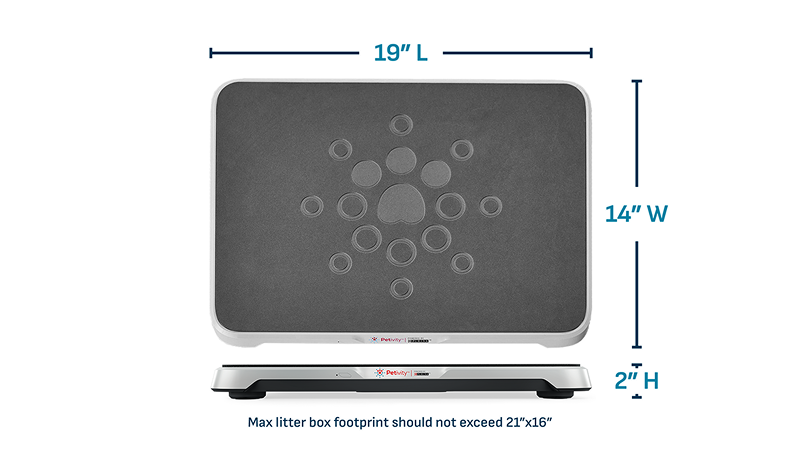
Top and side views of a rectangular black tray with circular patterns and dimensions labeled 19 inches long, 14 inches wide, and 2 inches high.

The smart monitor works with conventional rectangular or oval litter boxes no larger than 21” x 16”. Avoid self-cleaning or triangular-shaped corner boxes.

Download the Petivity App

You can download the free Petivity app at any point. Though you won’t be able to fully set up the system until the smart monitor arrives, it’s always good to be prepared.

We can’t wait for you to get your Smart Monitor and discover a whole new dimension of your cat’s health. Here’s to a new standard of care!

Best-in-Class Consumer Support

If you need further assistance, we’re here to help, 7 days a week.